


Quick answer: what does INP mean for eCommerce?
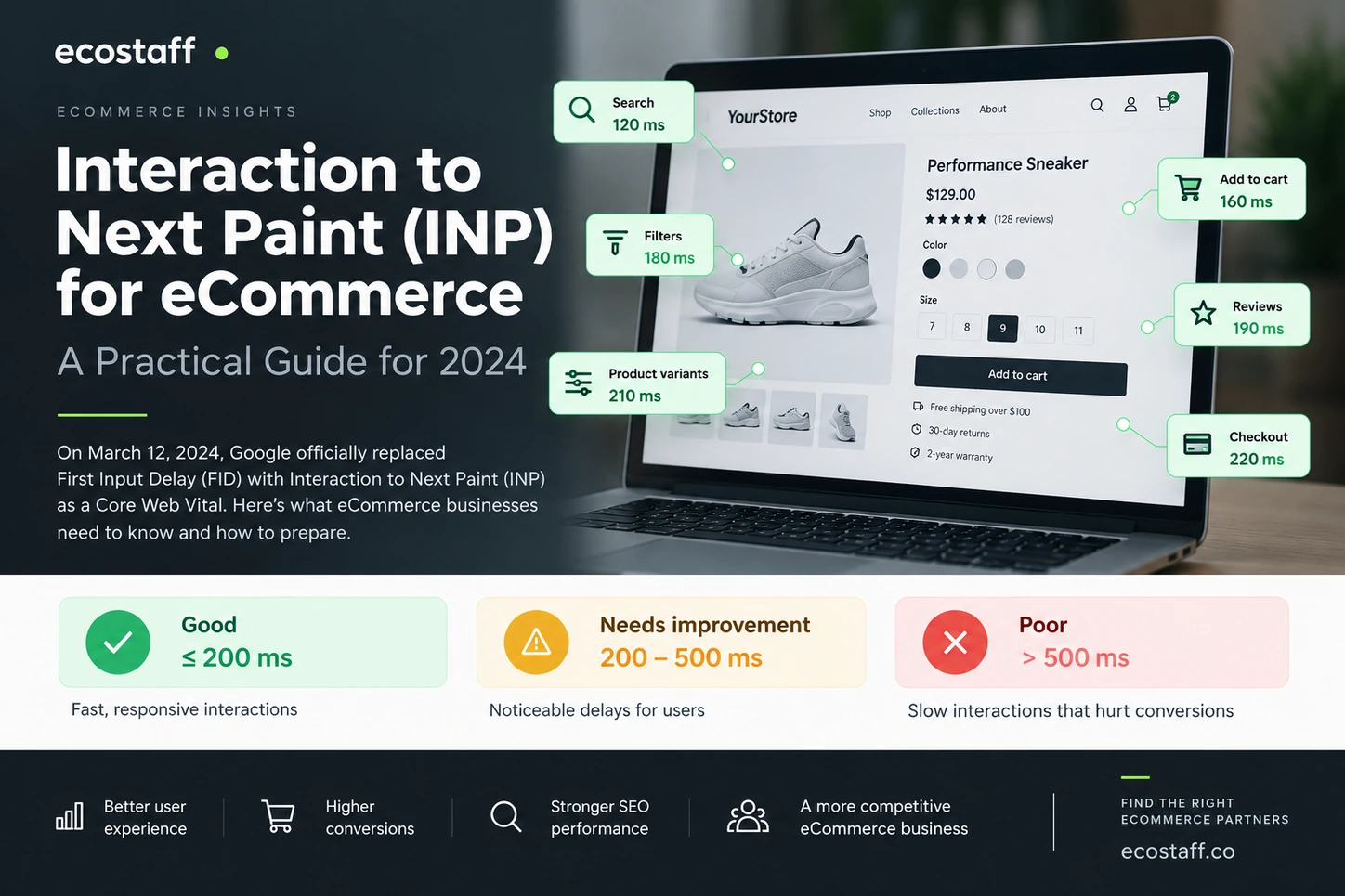
Interaction to Next Paint (INP) is now the Core Web Vital for responsiveness. On March 12, 2024, it officially replaced First Input Delay (FID). For eCommerce teams, that means Google is no longer focused only on the delay before a user’s first interaction. INP looks across interactions during the visit and asks a more useful question: when a shopper clicks, taps or types, how quickly can the page show the next visual response?
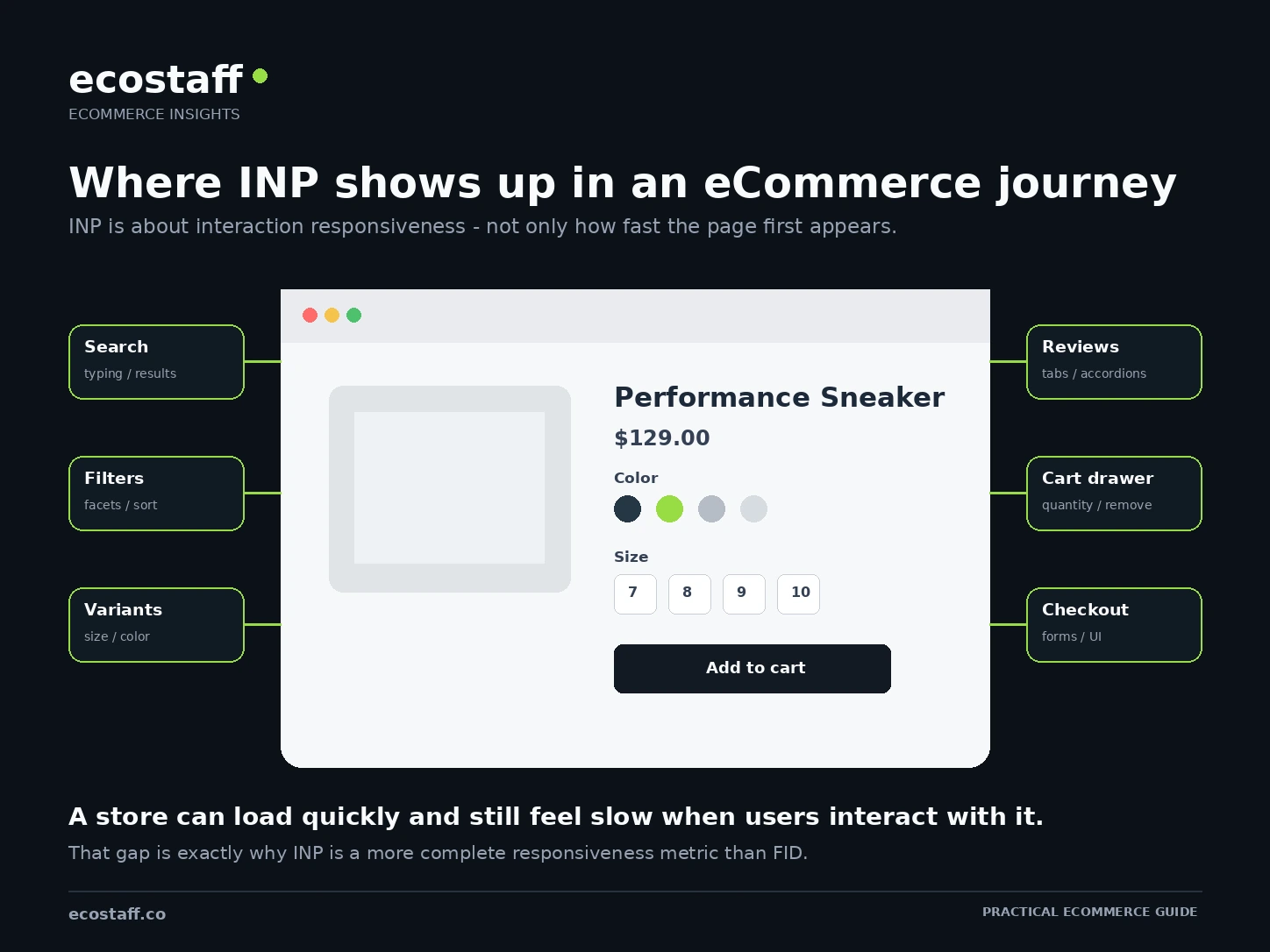
For an eCommerce store, the interactions worth checking first are usually search, filters, product variants, add-to-cart controls, cart drawers, accordions, reviews and checkout UI. A good INP is 200 milliseconds or less at the 75th percentile. Values above 200 ms need improvement, while values above 500 ms are considered poor.
Storefront performance is often discussed as if it were only about page load speed. That is incomplete. A product page can appear quickly and still feel slow when a shopper changes a size, opens a filter, adds an item to the cart or starts checkout.
That gap between loading and responding is why Interaction to Next Paint matters. The metric was introduced to give a more complete view of responsiveness than First Input Delay, and in March 2024 it became one of Google’s three Core Web Vitals.
This guide explains what changed, what INP measures, where eCommerce stores commonly struggle, how to diagnose the problem and how to prioritize fixes without removing useful shopping functionality.
What changed on March 12, 2024?
On March 12, 2024, Google and the Chrome team made Interaction to Next Paint a stable Core Web Vital and replaced First Input Delay. The change had been announced in advance, but this date marked the point when INP became the official responsiveness metric in the Core Web Vitals set.
The reason for the change is important. FID measured only the delay before the browser began processing the first user interaction. It did not capture the full time until a visual response, and it did not tell you whether later interactions were slow. INP evaluates interaction latency across the page visit and includes the time until the browser is able to paint the next frame.
Google’s March 12 announcement described INP as a more complete responsiveness metric and confirmed that tools such as PageSpeed Insights would use INP instead of FID in Core Web Vitals assessments. You can read the original announcement on web.dev.
| Responsiveness metric | What it focuses on | Main limitation or benefit |
|---|---|---|
| FID | Delay before processing the first interaction | Only the first interaction and only the input-delay portion |
| INP | Latency of interactions across the visit until the next paint | Better reflects whether the page consistently responds to user input |
How INP measures responsiveness
What does Interaction to Next Paint actually measure?
INP observes the latency of click, tap and keyboard interactions. An interaction begins when the user provides input and ends when the browser is able to present the next frame that reflects the result of that input.
That latency can include three broad parts:
- Input delay – the browser is busy and cannot begin the event handler immediately.
- Processing time – JavaScript event handlers or application logic are doing work.
- Presentation delay – the browser still needs to calculate layout, style, rendering and paint before the user sees feedback.
This matters because users do not experience these parts separately. They click a control and either the interface responds quickly or it does not. The practical goal is not to optimize a metric in isolation. It is to reduce the delay between intent and visible feedback.
The detailed technical definition and measurement model are available in Google’s Interaction to Next Paint documentation.
What is a good INP score?
Google recommends evaluating INP at the 75th percentile of page loads, separated by mobile and desktop where possible. The thresholds are:
| INP | Assessment | What it means |
|---|---|---|
| ≤ 200 ms | Good | The page is consistently responsive for most users |
| > 200 ms and ≤ 500 ms | Needs improvement | Some interactions can feel delayed and should be investigated |
| > 500 ms | Poor | Slow interactions are likely to be noticeable and frustrating |
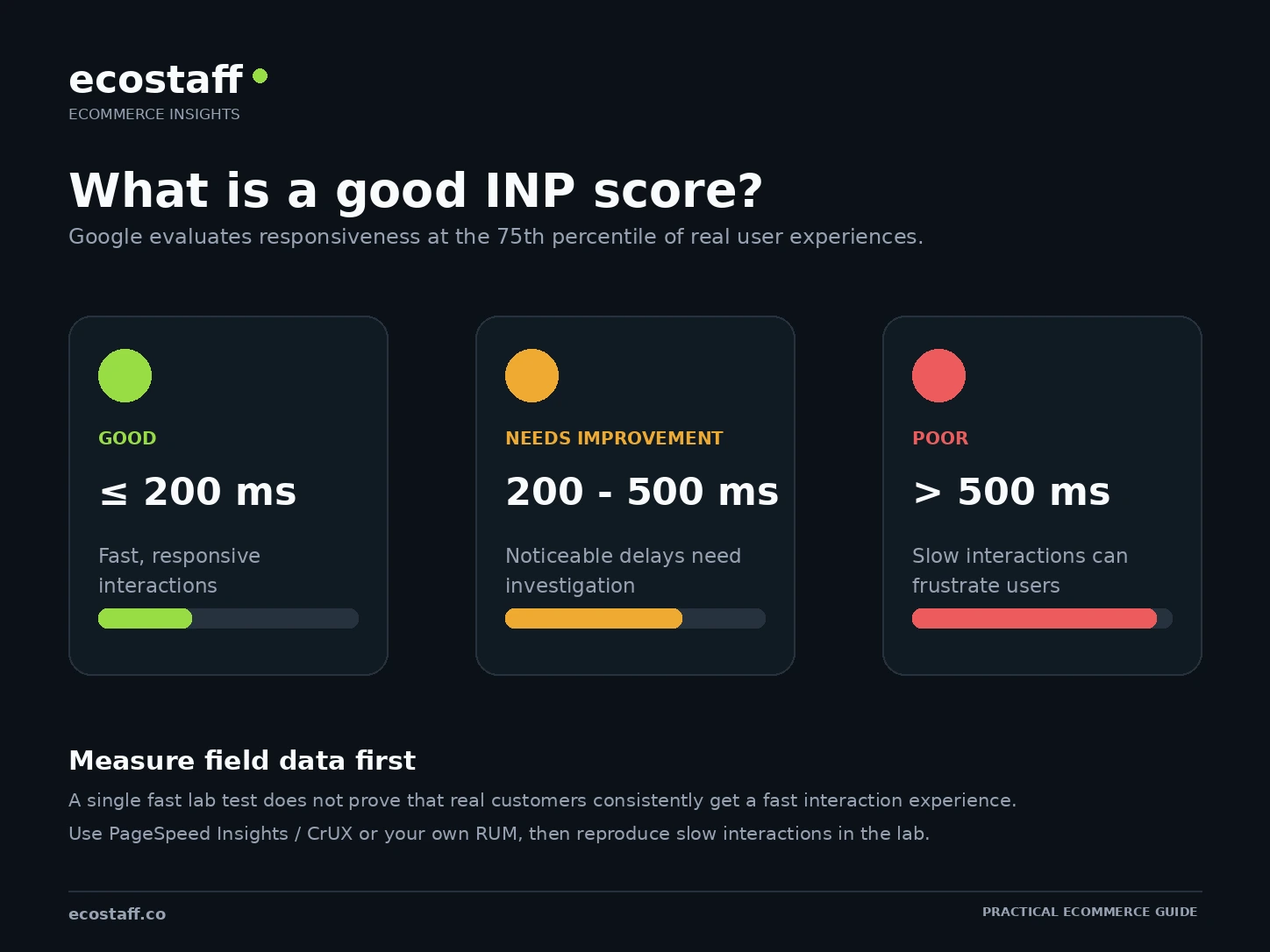
The percentile point is easy to miss. You are not trying to make one perfect test run. You are trying to make the experience consistently responsive for the large majority of real customers, including people on slower devices and busier pages.
Why INP matters so much for eCommerce
eCommerce storefronts are interaction-heavy by design. A shopper may perform dozens of actions before purchasing, and many of those actions trigger JavaScript, DOM updates, analytics events or requests to apps and APIs.
Product discovery
Search boxes, predictive search, collection filters, sorting, mega menus and faceted navigation can all create expensive client-side work. The storefront may need to update a large result set, recalculate the DOM or execute several scripts before it can paint the next state.
Product selection
Variant selectors can update price, inventory, media, product identifiers, subscription options, delivery estimates and URL state at the same time. On complex product pages, one size or color click may trigger much more work than the UI suggests.
Cart and checkout
Add-to-cart buttons, cart drawers, quantity controls, discount logic, shipping estimators and checkout extensions are commercially important. They are also exactly the interactions where a visible delay feels most risky because the customer is already trying to complete an action.
Content and trust elements
Reviews, accordions, size guides, comparison tools, personalization widgets and recommendation carousels can all add interaction work. The goal is not to remove useful conversion features automatically. The goal is to understand their cost and implement them without making the main thread unresponsive.
Common causes of poor INP on eCommerce sites
Poor INP is usually a symptom rather than a single bug. The same visible delay can come from different technical causes, so diagnosis matters before optimization.
1. Too much JavaScript on the main thread
Large JavaScript bundles, expensive framework work and long-running tasks can prevent the browser from responding to input. If a shopper clicks while the main thread is busy, the interaction waits.
2. Third-party apps and tracking
Analytics, advertising pixels, chat, reviews, personalization, A/B testing, loyalty, recommendations and other apps can compete for main-thread time. An individual script may look small, but the combined execution cost can become significant, especially on mobile devices.
3. Large DOM updates
Filtering a collection, opening a large menu or updating several product-page sections can cause style calculation, layout and rendering work across many elements. JavaScript may finish quickly while the browser still spends time preparing the next frame.
4. Expensive event handlers
A click handler that performs synchronous calculations, loops through many elements, reads and writes layout repeatedly or triggers several dependencies can turn a simple interaction into a long task.
5. Too much work at startup
INP is not a loading metric, but heavy page startup can still damage responsiveness. Shoppers often begin interacting before every non-critical script has finished evaluating. If startup JavaScript blocks the main thread at that moment, the user’s interaction is delayed.
Google’s INP optimization guidance emphasizes reducing input delay, processing time and presentation delay rather than assuming one universal fix.
How to measure INP correctly
The most useful workflow combines field data and lab diagnosis. Field data tells you whether real users have a problem. Lab tools help explain why.
Start with real-user data
PageSpeed Insights can show Chrome User Experience Report data when enough real-user data is available. Search Console’s Core Web Vitals report can help identify groups of URLs with responsiveness problems. Stores with their own Real User Monitoring can go deeper and segment by template, device, browser, geography or logged-in state.
Field data is important because a developer’s laptop, connection and browsing behavior may be very different from a customer’s mobile device. A store can look fast in a controlled test while slower devices experience long interaction delays.
Then reproduce the slow interaction
Once you know which page type is struggling, reproduce meaningful user actions: open filters, choose a variant, add an item to the cart, change quantity, open reviews or use predictive search. Chrome DevTools can then show the main-thread tasks, event handlers and rendering work around that interaction.
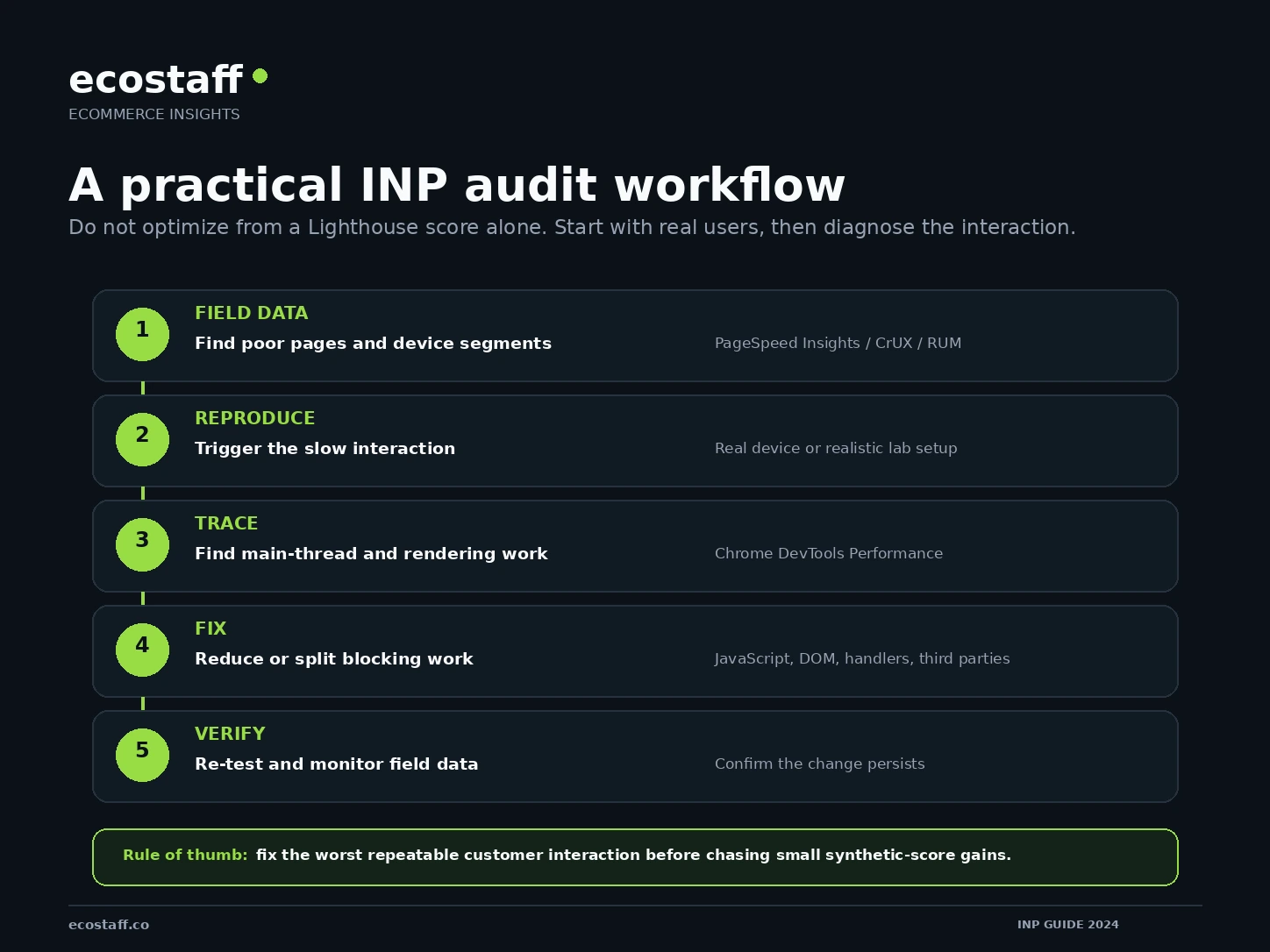
For technical investigation, Google’s guide to diagnosing slow interactions in the lab provides a useful process for tracing an interaction and finding the work that blocks it.
Platform-specific INP considerations
The metric is platform-neutral, but the likely sources of interaction work differ by storefront architecture, theme, extensions and customization.
Shopify
Shopify made storefront performance especially visible in early 2024. Its Winter ’24 Edition introduced a new web performance dashboard based on Core Web Vitals and real-user insights. Shopify described the dashboard as replacing its older single Speed Score approach with loading speed, interactivity and visual stability metrics.
For Shopify stores, investigate theme JavaScript, app scripts, product-form logic, predictive search, filtering, section rendering and cart-drawer behavior. Removing every app is rarely a sensible first step. Start by identifying which scripts and interactions create measurable blocking work.
Shopify’s January 31, 2024 announcement is available in the Winter ’24 Edition overview and its web performance dashboard introduction. If you need external implementation support, Ecostaff also organizes Shopify development companies by platform expertise.
WooCommerce
WooCommerce performance depends heavily on the WordPress theme, plugin stack and custom front-end behavior. INP issues may come from variation forms, AJAX cart updates, filtering plugins, page builders, consent tools, tracking scripts or third-party widgets.
Because the stack is flexible, optimization should start with evidence. A plugin count alone does not tell you which code is blocking interaction. Trace the slow action, identify the responsible script or rendering work, then decide whether to optimize, defer, replace or remove it. For implementation partners, see WooCommerce development companies.
Magento and Adobe Commerce
Magento and Adobe Commerce projects often have complex themes, modules, integrations and catalog functionality. Storefront responsiveness can be affected by custom JavaScript, layered navigation, large DOM structures, personalization, third-party extensions and heavily customized checkout flows.
In these environments, an INP project should be tied to specific templates and interactions rather than treated as a generic “make the site faster” task. Ecostaff’s Magento specialists and broader custom eCommerce development companies can be useful starting points when the fix requires deeper engineering work.
How to improve INP without damaging the shopping experience
The wrong optimization approach is to remove every interactive feature until the metric improves. A technically fast store that loses useful merchandising, trust or conversion functionality is not automatically better.
Prioritize changes that reduce unnecessary blocking work while preserving customer value:
- Break up long main-thread tasks. Large synchronous tasks delay user input. Split work so the browser gets opportunities to respond.
- Ship less unnecessary JavaScript. Audit code that runs on every page even when the feature is not needed there.
- Delay non-critical third-party work. Marketing and support tools should not all compete with the first meaningful shopping interactions.
- Simplify expensive interaction handlers. Avoid doing more work than necessary when a shopper changes a variant, filter or cart quantity.
- Reduce large rendering updates. Updating a smaller part of the interface is often better than rebuilding a large section of the DOM.
- Give immediate visual feedback. A pressed state, spinner or optimistic UI does not replace performance work, but it can make necessary asynchronous operations clearer to the customer.
- Test on realistic devices. Mobile CPU limitations can reveal blocking work that is almost invisible on a high-end desktop.
Optimize the customer interaction, not just the score. The best INP work starts with a real shopping action that is slow, finds the blocking work behind it and verifies that the experience improves for real users.
A practical INP checklist for eCommerce teams in 2024
- Check whether real-user INP data is available in PageSpeed Insights or Search Console.
- Separate mobile and desktop results when you have enough data.
- Identify the page types with the worst responsiveness: home, collection, product, cart or checkout-related pages.
- List the commercially important interactions on those templates.
- Reproduce the slowest interactions on a realistic mobile setup.
- Record a performance trace around the interaction.
- Look for long tasks, expensive event handlers, script evaluation and large rendering updates.
- Map third-party scripts to the business feature they support.
- Fix the largest repeatable source of blocking work first.
- Re-test the exact interaction before and after the change.
- Monitor field data after deployment instead of relying only on the lab result.
- Repeat the process for the next high-impact interaction.
When should you involve an eCommerce agency?
Some INP problems can be fixed by an internal developer in a few hours. Others require theme architecture changes, app replacement, front-end refactoring or platform-specific expertise. Outside support is more likely to make sense when:
- field data shows persistent poor INP across important templates;
- your team cannot reproduce or trace the slow interactions;
- the main bottleneck sits inside a custom theme or complex application code;
- third-party apps and tracking have grown without clear ownership;
- performance work risks affecting checkout, analytics or revenue-critical features;
- the same issue returns after each theme or feature release.
When evaluating a partner, ask for a diagnosis process before asking for a guaranteed score. A credible performance specialist should be able to explain how they use field data, reproduce interactions, profile the main thread, distinguish JavaScript from rendering problems and verify the result after deployment.
You can use the Ecostaff company directory to compare providers, or start with the dedicated performance optimization category.
Frequently asked questions about INP and eCommerce
Did INP replace FID?
Yes. Interaction to Next Paint officially replaced First Input Delay as a Core Web Vital on March 12, 2024. INP gives a broader view of responsiveness because it considers interactions throughout the page visit and measures through to the next paint.
What is a good INP for an eCommerce site?
A good INP is 200 milliseconds or less at the 75th percentile. More than 200 ms and up to 500 ms needs improvement. Above 500 ms is poor.
Can a site have good LCP but poor INP?
Yes. LCP measures loading performance while INP measures interaction responsiveness. A page can render its main content quickly and then become slow when users interact with menus, variants, filters, cart controls or other JavaScript-driven features.
Does a good Lighthouse score guarantee good INP?
No. Lab tools are useful for diagnosis, but Core Web Vitals are designed around real-user experience. Use field data when available, then use laboratory tools to reproduce and debug specific slow interactions.
Will improving INP improve Google rankings?
Core Web Vitals are part of the page-experience signals Google recommends site owners improve, but a good INP score does not guarantee higher rankings. Relevance and overall content quality remain fundamental. Treat INP primarily as a user-experience and technical quality target, with search visibility as one part of the wider business case.
Sources and further reading
- web.dev – Interaction to Next Paint is officially a Core Web Vital, March 12, 2024.
- web.dev – INP becomes a Core Web Vital on March 12, January 31, 2024.
- web.dev – Interaction to Next Paint (INP).
- web.dev – Optimize Interaction to Next Paint.
- Shopify – Winter ’24 Edition highlights, January 31, 2024.
- Shopify Performance – New web performance dashboard with real user insights, January 31, 2024.
Conclusion
INP changes the way eCommerce teams should think about performance in 2024. A fast first render is not enough if the interface becomes unresponsive when a shopper actually tries to use it.
Start with field data, identify the slow interaction, reproduce it, trace the work that blocks the next paint and fix the largest repeatable cause. For stores with complex themes, app stacks or custom front ends, this process can be more valuable than chasing a generic performance score because it ties technical work directly to the shopping experience.
